The Most Evil Sorority Girl. Ever.
via Gawker:
I’d quote a selection from her email but I think my computer would choke on the sheer number of f-bombs.
Lol, this woman is bitchy evil incarnate but she has such a masterful grasp of profanity.
Pages
via Gawker:
I’d quote a selection from her email but I think my computer would choke on the sheer number of f-bombs.
Lol, this woman is bitchy evil incarnate but she has such a masterful grasp of profanity.
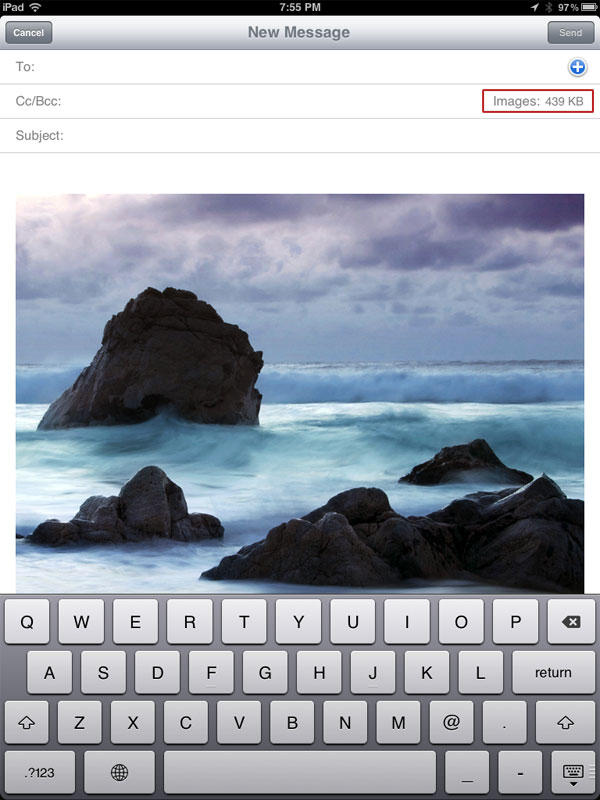
If you ever need to upload a photo from your iPad, iPhone, or iPod Touch to LGF that’s larger than the allowed 400K and you don’t have an app to do resize for you, here’s a quick and easy workaround using email.
Note: The following only applies to fairly large images, like those taken with your device’s camera. With smaller images you won’t be given the option to resize when trying to email them. I’m not sure what the exact cut-off point is, but hopefully it’s less than 400K.
Step 1: Go into your photos and choose the image you want to send. Now hit the little options arrow that let’s you choose what you want to do with it. Once you choose “Email Photo”, it’ll embed the image into an email.
Off to the right, at the end of the CC/BCC field, you should see your image info as shown below (it may be different on newer iPads—mine is ancient). Tap it.
Step 2: You should now be presented with options to resize it. Choose one and then mail it to yourself.
Once you receive it, just tap the photo to select it and you’ll see the option to save it.
As with the iPad, you go into your photos and choose the image you want to send, then hit the options arrow that let’s you choose to email it. Once you fill out the “To” field—which is the only field that must be filled out—you can simply hit “Send” and it’ll automagically present you with resizing options.
Emailing a photo from an iPod Touch (5th Gen)As with the iPad, once you receive it just tap the photo to select it and you’ll see the option to save it.
As Charles mentioned in the thread that prompted me to create this Page, there’s a $2 app that looks like it can do batch resizing, so you might want to take a look at it. I said I wasn’t going to buy another app, but on second thought…
Proposal to Let Feds Snoop on Emails Dropped - US News and World Report
Democratic Sen. Patrick Leahy of Vermont has killed a controversial portion of a bill he proposed that would have allowed more than 20 government agencies to access Americans’ emails without a warrant, CNET reports.
Leahy originally proposed the bill to increase email and Internet privacy. But he received pushback from law enforcement interests, so he amended it to allow warrantless access to email by a bevy of government agencies, from the Securities and Exchange Commission to the Mine Enforcement Safety and Health Review Commission. That revised version sparked outrage among civil liberties proponents and a coalition of technology companies. On Tuesday Leahy abandoned the offending amendments altogether.
Leahy’s office said Tuesday on Twitter the proposed changes were only “ideas,” and would not withstand the mark-up phase of the bill process in the Judiciary Committee, which he chairs.
Slave to your email? Wonder what would happen if you had to do without it? UC Irvine informatics professor Gloria Mark was curious — so she recently led a study that separated 13 people from their email for five days and recorded what happened when they unplugged.
Mark spoke with The Times about the joys and sorrows of ditching email and why the Army is interested in her research.
What made you want to see how people fared without email?
That was way back in 2005. I had this crazy idea that people were addicted to email. So I started thinking, the way you can test that is if you take people away from email cold turkey. You should see symptoms of withdrawal, the same way people are addicted to alcohol or drugs.
It took four years to find a test site willing to give it a try. Were employers worried it would wreck business?
Yes. People were interested because they wanted to find ways to reduce the email overload. But on the other hand, they just said, “Wow, we just can’t afford to do this.”
In 2009, I was invited to give a talk at the Army’s Natick Soldier Systems Center outside Boston, and I asked if they wanted to take part. At first they said no, but then I talked to them about the relevance for soldiers in the field — what would happen if a soldier was taken out of commission? How would the other people in their unit reconfigure to communicate?
Also, everybody at Natick was complaining about email and information overload. So they agreed.
How did you do the study?
We had 13 volunteers who were civilian employees at Natick. First we did a baseline measure — we had them work as usual for several days. Then we cut off email for five days, continuing to take our measurements.
We couldn’t see a discernible trend on days 1 and 2. But at day
Twenty years ago, I did something that ended up changing my life: I got my first email address. Now, I’m not one of those persons who simply got their first email in high school, or through an AOL account. Instead, email was something rather mythical that I read about when I found a book called “the hacker bible” in the IT department of a local book store. The book largely consisted of photo copies of slightly outdated hacker zines from both the U.S. and Germany, which left me with the impression that I had to build my own acoustic coupler and then somehow get access to something called a VAX to ever use email.
Luckily, I checked with someone at a small computer store first, where I learned that I could just buy a 2400 bps modem instead. They also gave me the contact info of a local hacker club. One thing led to another, and I was soon the proud owner of a 30 character-long email address. Initially, it didn’t get all that much use. On an average day, I’d maybe get one email, likely containing little more than the next move of an email chess game I’d play with a friend from school.
Little did I know that 20 years later, I would get hundreds of emails every single day. Here’s what I learned from using email for 20 years:
1. I’m old. I’m not just saying this to be coy, or because 20 years is a really long time. But I recently realized that I cannot imagine a future without email. I know that plenty of folks have moved on to Facebook messages, IM, corporate messaging networks, and so on. Kids increasingly see email as something old people do. Well, guess what: I’m one of those old people. Sure, I also use all of those other ways of communication. But I grew up with email, and it will always be what I’m gonna check first thing in the morning.
2. Reinventing yourself is good.
Back in the day, Hotmail was, well, pretty hot.
It was one of the first free Web-based email services available, instantly attracting a lot of users. It still has hundreds of millions of users worldwide.
But it’s time to start saying goodbye to Hotmail.
On Tuesday morning, Microsoft launched the preview version of Outlook.com, its new personal, free Web-based email service.
Eventually, Microsoft intends to migrate all Hotmail users to Outlook.com. But for the time being, Hotmail users can continue to use the same interface they’ve been using. Hotmail users who choose to do so will also be able to keep their Hotmail addresses even after moving over to Outlook.com.
Outlook.com combines both the familiar and the new.
Millions of people already use Outlook — Microsoft’s email, contacts, calendar and task-management system — primarily at work. It also comes bundled with several versions of Office, Microsoft’s productivity suite with a billion users worldwide.
It’s a name people are familiar with and already associate with email.
Branding both the business and personal email offerings from Microsoft with the same name “is very simplifying” for people, said Dharmesh Mehta, a senior director at Microsoft.
At the same time, Outlook.com is a spiffed-up-looking version of Outlook, featuring a clean new design and new features.
Outlook.com came about when Microsoft realized that “Web mail hasn’t kept up with what people are doing,” Mehta said.
Outlook engineers began thinking about “what does it mean to have a modern email,” he said.
Thus, Outlook.com includes features such as the option to connect to Facebook, Twitter and other social networks; the ability to open, edit and share Office documents anywhere via Office Web Apps; and options to easily connect in other ways, such as chat or a status update from a social network.
Google has acquired e-mail software startup Sparrow in a move that brings its team to work on Google’s Gmail product.
Sparrow’s chief executive Dom Leca announced the news on the company’s site and Twitter account this morning, as well as in an e-mail to existing Sparrow users.
Leca says that the company will continue to make Sparrow available, and keep it up and running with support, though he did not offer any details about the addition of any new features in the months ahead.
Sorry to see this happening. Sparrow is a very nice email client for OS X and iOS. If you are a Gmail user, this is good news, because it should drastically improve the UE for Gmail. Not such good news for Sparrow users that do not have Gmail accounts.
Below is an email that is going around Right Wing Whacko circles. It is about a the linked YouTube video of edited clips of Obama seeming to aggrandize Islam. The intention is clear —to show that Obama is on his own personal Jihad to take over America and subjagate it to the Caliphate.
Subject: Fwd: FW: This was blocked from Fox News….
This lying fraud would climb a tree to tell a lie when the truth would
sound better, but on this occasion, I actually believe the Muslim bastard!
Suggest you watch this before BO has it pulled again!
EVALUATE AND DRAW YOUR OWN CONCLUSION!!!
This was blocked from Fox News….
This is what Obama blocked Fox News from showing …Remember all the notices we kept getting to watch Fox News on Sunday at
9 PM several weeks ago? What Happened?This is the clip that got pulled due to pressure from the
Administration.Obama Puts Heat on Fox News to Prevent Sean Hannity airing this piece.
This is a video that Sean Hannity of FOX News has been trying to show
that we are told has consistently been blocked by the Obama
Administration for several weeks.Watch it now before it gets pulled from the internet!
It could be a version of the same outdated email shown here on Snopes.com. Recirculation of old propaganda is common.
According to Truth of Fiction.com it is indeed a recirculation and edited-for- nuance version of the 2008 story.
The same story is appears on Sean Hannity’s blog.
The purpose of the video/email campaign is clear —to stir up the Whacko Christian voter and reinforce fear of Islam and Obama.
But Rehashing old propaganda really isn’t news. The Whackos won’t care. That he did it at all is enough.
What I think is interesting if not down-right sad, is that to the sane the video (as highly edited as it is) really isn’t all the damaging. After all this country has been thru since 9/11, I think it is clear that we are not in danger of being absorbed into some fantasy version of the Caliphate. We are a multi-religious country. And the Whacko Christian Minority must face this.
UPDATE: I should add that in none of my research was there any proof that Obama tried to censor Fox News. The idea that he would limit 1st Amendment Rights of his biggest journalistic rival is a little strange to me. He is an attorney and a politician. He wants to be reelected. He knows full well that any attempt to censor Fox would backfire in a big way. He is not the the Kenyan, Muslim version of Stalin.
A key change was made to your Facebook profile recently that you may not have noticed yet. Facebook has replaced the primary email address users entered in their profile contact information with brand-new @facebook.com addresses. These addresses allow you to email external accounts from your Facebook inbox. Forbes first noticed the change:
“No one seems to want the Facebook inbox to be their main email account (with good reason). Facebook is trying to change that with a new little nudge. On your profile page, Facebook has taken the liberty of making your Facebook email your default contact address.”
LifeHacker has instructions on how to quickly change your primary email information back.
We asked Facebook to explain, and got a statement reminding us that the company announced back in April that it would update addresses “to make them consistent across our site.” Facebook says you can still choose which email contact information you want to show on your profile.
Internet-based social networking sites have created a revolution in social connectivity. However, con artists, criminals, and other dishonest actors are exploiting this capability for nefarious purposes.
There are primarily two tactics used to exploit online social networks. In practice, they are often combined.
1. Computer savvy hackers who specialize in writing and manipulating computer code to gain access or install unwanted software on your computer or phone.
2. Social or human hackers who specialize in exploiting personal connections through social networks. Social hackers, sometimes referred to as “social engineers,” manipulate people through social interactions (in person, over the phone, or in writing).
Humans are a weak link in cyber security, and hackers and social manipulators know this. They try to trick people into getting past security walls. They design their actions to appear harmless and legitimate.
Falling for an online scam or computer hack could be damaging for an individual victim as well as the organization the victim works for. Such risks include:
Vulnerability of Social Networking Sites
Social networking sites are Internet-based services that allow people to communicate and share information with a group.
Risks:
Once information is posted to a social networking site, it is no longer private. The more information you post, the more vulnerable you may become. Even when using high security settings, friends or websites may inadvertently leak your information.
Personal information you share could be used to conduct attacks against you or your associates. The more information shared, the more likely someone could impersonate you and trick one of your friends into sharing personal information, downloading malware, or providing access to restricted sites.
Predators, hackers, business competitors, and foreign state actors troll social networking sites looking for information or people to target for exploitation.
Information gleaned from social networking sites may be used to design a specific attack that does not come by way of the social networking site.
Tactics:
Baiting - Someone gives you a USB drive or other electronic media that is preloaded with malware in the hope you will use the device and enable them to hack your computer.
Do not use any electronic storage device unless you know its origin is legitimate and safe. Scan all electronic media for viruses before use.
Click-jacking - Concealing hyperlinks beneath legitimate clickable content which, when clicked, causes a user to unknowingly perform actions, such as downloading malware, or sending your ID to a site. Numerous click-jacking scams have employed “Like” and “Share” buttons on social networking sites. Disable scripting and iframes in whatever Internet browser you use. Research other ways to set your browser options to maximize security.
Cross-Site Scripting (XSS) - Malicious code is injected into a benign or trusted website. A Stored XSS Attack is when malicious code is permanently stored on a server; a computer is compromised when requesting the stored data. A Reflected XSS Attack is when a person is tricked into clicking on a malicious link; the injected code travels to the server then reflects the attack back to the victim’s browser. The computer deems the code is from a “trusted” source.
Turn off “HTTP TRACE” support on all webservers. Research additional ways to prevent becoming a victim of XSS.
Doxing - Publicly releasing a person’s identifying information including full name, date of birth, address, and pictures typically retrieved from social networking site profiles.
Be careful what information you share about yourself, family, and friends (online, in print, and in person).
Elicitation - The strategic use of conversation to extract information from people without giving them the feeling they are being interrogated. Be aware of elicitation tactics and the way social engineers try to obtain personal information.
Pharming - Redirecting users from legitimate websites to fraudulent ones for the purpose of extracting confidential data. (E.g.: mimicking bank websites.)
Watch out for website URLs that use variations in spelling or domain names, or use “.com” instead of “.gov”, for example. Type a website’s address rather than clicking on a link.
Example:
Most computer infections come from websites. Just visiting a website can expose your computer to malware even if you do not download a file or program. Often legitimate sites may be unknowingly infected. Websites with information on popular celebrities or current sensational news items are frequently hijacked by criminals, or criminals may create such websites to lure victims to them.
Phishing - Usually an email that looks like it is from a legitimate organization or person, but is not and contains a link or file with malware. Phishing attacks typically try to snag any random victim. Spear phishing attacks target a specific person or organization as their intended victim.
Do not open email or email attachments or click on links sent from people you do not know. If you receive a suspicious email from someone you know, ask them about it before opening it.
Example:
Turn off ads by subscribing!
For about 33 cents a day, our subscription option turns off all advertisements at LGF!
Read more...
This is the LGF Pages posting bookmarklet. To use it, drag this button to your browser's bookmark bar, and title it 'LGF Pages' (or whatever you like). Then browse to a site you want to post, select some text on the page to use for a quote, click the bookmarklet, and the Pages posting window will appear with the title and text already filled in.
Last updated: 2013-05-19 10:14 am PDT
Haywood Jabloeme
Haywood Jabloeme
bubba zanetti
Haywood Jabloeme
Haywood Jabloeme
Haywood Jabloeme
theye1Why doncha come on over to the house and I'll show 'em to ya? -- Senate hearing on pornography in music, when Sen. Paula Hawkins from Florida said ... "I'd like to see what kind of toys your children play with."